Table of Contents

1. Introduction: (Best Foldable, Dual-Screen & Novel Design Laptops 2025)
Best foldable, dual-screen & novel design laptops 2025 are the most visible sign that laptop design is finally breaking out of decades of sameness. Instead of forcing everyone to accept a rigid clamshell and a single rectangle display, manufacturers are asking: what if the screen could reshape for different tasks? Or what if you had a second display built into the chassis for timelines, tool palettes, or secondary windows?
By 2025, advances in flexible OLED manufacturing, hinge engineering, and software mapping have turned prototypes into products people actually buy. Some devices remain niche due to price and software quirks, but a small group of models moved past gimmick status into “I’d seriously consider this” territory for creators, power users, and mobile productivity specialists.
2. The evolution: from concept to practical product
A brief timeline for best foldable, dual-screen & novel design laptops 2025:
- 2019–2021: Concepts and early dual-screen experiments (Microsoft Surface Neo concept era, Intel concept machines).
- 2021–2023: First real products: early foldables and the first Zen book Fold / ThinkPad Fold prototypes. Early units highlighted the promise but revealed issues weight, thickness, keyboard ergonomics, and app compatibility.
- 2023–2024: Manufacturers improved the hardware thinner fold panels, stronger hinges and started shipping more polished foldables and dual-screen laptops. Software workarounds better window snapping, dock modes made them more usable.
- 2025: Iterations solidify the field: better displays with minimal crease visibility, thinner and lighter designs, and refined second-screen utility in real workflows. CES 2025 showcased refreshed and more practical dual-screen designs from major brands.
3. Core technologies that make these designs possible
Understanding the basics helps you judge whether a model is worth the premium.
Flexible OLED panels
Foldable laptops rely on flexible OLED (FOLED) panels that can bend without breaking the pixels. Supply chain improvements reduced visible creasing and improved longevity, but panel costs remain high which is why foldables sit at the premium end of the market.
Hinges and structural engineering
A foldable laptop’s hinge must do two jobs: protect the display at the fold and provide a stable, comfortable typing/viewing angle. Engineers used multi-link hinges, protective layers around the fold, and precision magnetics to keep the screen aligned over thousands of cycles. The sturdier hinge mechanisms add weight and cost, so design tradeoffs are common.
Detachable and second-screen keyboards
Some foldables pair with magnetic keyboards (detachable) or place a physical keyboard on part of the folded display each approach brings tradeoffs: detachable keyboards add bulk to carry; keyboards on the screen simplify setup but reduce visible screen area in certain modes.
Software adaptation
Hardware means nothing without software that adapts window layouts, virtual keyboards, and app scaling to non-standard aspect ratios. Windows 11 and recent laptop UIs now offer richer split-screen modes and pen/gesture optimizations for foldable formats. Still, app compatibility (especially older or niche apps) can be a pain point. Reviews repeatedly show that mainstream apps work well, but edge cases exist.
4. Types of novel laptop designs you will see in 2025
Not all “novel” laptops are foldables. Here’s a taxonomy:
- Single-panel foldables: One flexible OLED that folds inside the chassis (e.g., large foldable that opens to a tablet-sized surface). Great for a tablet-first workflow with occasional typing via detachable keyboards.
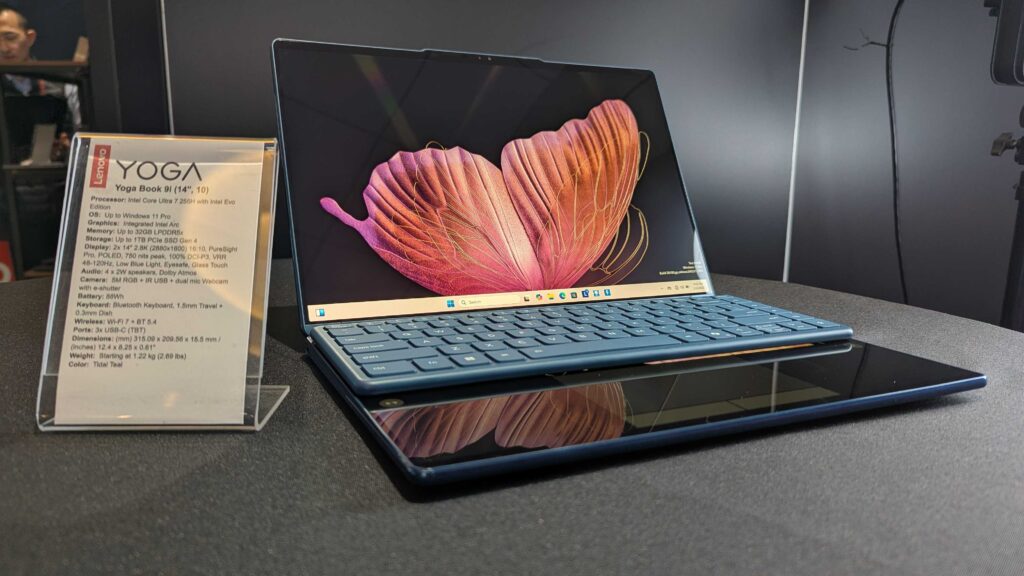
- Dual-screen clamshells: Two separate rigid displays stacked (one where a trackpad would be). This includes ASUS Zenbook Duo variants and Lenovo Yoga Book designs. Excellent for secondary toolbars, streaming controls, or always-on chat.
- Hybrid flip and rotate screens: Convertible hinges that rotate the screen to transform the device into tent, tablet, or presentation modes. These are mature and popular among 2-in-1 buyers.
- Modular or attachable secondary screens: A detachable thin monitor that clips or folds out from the laptop (useful for those who want multi-screen but don’t want the premium of an integrated dual-screen).
- Experimental displays: Wraparound screens, curved inner bezels, or laptops with small always-on external panels for notifications.
Each design serves different users: creators and coders love the extra vertical space a foldable offers; streamers and multitaskers find second screens transformative; casual users may find the added complexity unnecessary.
5. The best models of 2025 – in detail
Below are the top models that reviewers and hands-on testers repeatedly call the most successful implementations of novel designs for best foldable, dual-screen & novel design laptops 2025:
How I picked these: models that combine practical ergonomics, reliable hardware, and software that treats the second/folded screen as more than a gimmick. Sources include Laptop Mag, The Verge, Tom’s Guide, and CES 2025 coverage.
5.1 Lenovo ThinkPad X1 Fold (Gen 2 / 16-inch family) – Best overall foldable for productivity
Why it stands out: The X1 Fold matured into a large, polished machine that can be a tablet, a full-screen laptop, or a compact folded device. When opened flat it provides a generous 16-inch canvas with very good color accuracy making it especially attractive to writers, product managers, and professionals who want one-does-many workflow.
Strengths
- Excellent OLED image quality and HDR support.
- Solid build and ThinkPad-grade keyboard options (docked/folio keyboard attachments).
- Battery life decent for light productivity use.
Weaknesses
- Pricing is premium.
- Some apps do not adapt perfectly to unconventional aspect ratios (a software problem rather than hardware).
5.2 ASUS Zenbook 17 Fold OLED – Best for creators who want a full big canvas
ASUS’s Zenbook Fold was one of the earliest mainstream foldables to ship and remains a flagship example of “this is what a foldable should feel like.” The 17-inch foldable becomes a large tablet for sketching and a compact laptop for typing with a detachable keyboard. Tom’s Guide specifically called this product a glimpse into the future, with the caveat that price and raw performance tradeoffs mean it’s not for everyone.
Strengths
- Stellar OLED with excellent color coverage.
- Multiple setup modes (tablet, laptop, tent).
- Strong pen support for drawing and note taking.
Weaknesses
- Expensive.
- Heavy for long tablet hold use; best when used on surfaces.
5.3 ASUS Zenbook Duo / Zenbook Pro Duo family (dual screens) – Best dual-screen overall
ASUS’s second-screen laptop family (the Duo line) continues to refine the idea of an integrated secondary screen above the keyboard. For content creators, video editors, and multitaskers, it’s a highly productive layout: timeline or tool palettes on the ScreenPad Plus, main preview on the primary display. CES 2025 models refined thermals and preserved the Duo’s core value proposition.
Strengths
- Extremely productive for multitaskers.
- Good thermals in the latest refresh.
- Mature software that maps apps to the secondary screen.
Weaknesses
- The keyboard placement is different; there’s a learning curve.
- Heavier and thicker than clamshells.
5.4 Lenovo Yoga Book 9i / Yoga Book hybrid dual screen – Best lightweight dual-screen
Lenovo’s Yoga Book 9i and later refreshes offer a lighter alternative to the Zenbook Duo family. The approach favors portability while still giving the benefit of two displays. Reviewers at CES 2025 noted Lenovo’s attempts to refine the keyboard experience and make the second screen more useful in daily work.
5.5 Niche & notable mentions
- HP Spectre Fold / Elite Dragonfly Fold concepts: HP experimented with foldables and convertible designs with good build quality; watch future revisions.
- Acer and Dell prototypes: Both have shown dual-screen and foldable prototypes; manufacturing costs and market demand will shape whether these become mainstream.
- Modular secondary screens (third-party): Affordable way to get dual-screen productivity without buying an integrated device.
6. Real-world performance: what to expect
Multitasking & productivity
The best foldable, dual-screen & novel design laptops 2025 shine in multitasking. With one device you can have a full document on the main screen while the second screen hosts references, communication apps, or a virtual keyboard/palette. Creators can place editing tools on the secondary display and full previews on the main canvas a genuine productivity gain in certain workflows. Reviews repeatedly show that for these workflows, these devices are transformative.
Battery life
Larger, high-resolution OLEDs and multiple displays draw more power. Manufacturers counter this with larger batteries and aggressive power management, but expect battery life to be a step down from single-screen ultrabooks with comparable components. If long unplugged days are a priority, prioritize models with efficient SoCs and verify real-world battery tests in reviews.
Thermals and performance throttling
Compacting more screen and hinge complexity into a chassis limits cooling headroom. High-end variants with discrete GPUs may be thick and heavy; thin models may throttle under prolonged load. The best dual-screen models balance thermal design and performance read thermals tests from reputable reviews before buying.
Durability & repairability
Foldable screens are more fragile than rigid ones. Manufacturers improved durability diamond-like protective layers, reinforced folds, but the reality is: repairs remain expensive. Think about warranty and accidental damage coverage when buying. Reviewers note the hinge and fold life improved in 2024–25, but these are still premium devices where careful handling matters.
7. Use cases – who should buy a foldable/dual-screen laptop?
Be honest about the workflow. These devices are not for everyone.
Ideal candidates
- Content creators & video editors: benefit from extra screen real estate for timelines and palettes.
- Designers & illustrators: pen support and large tablet modes on foldables can replace portable drawing tablets.
- Power multitaskers: analysts, traders, and producers who need many windows open simultaneously.
- Mobile professionals who want a single device to serve many roles: meeting display, note-taking tablet, and laptop.
Who should avoid them
- Budget buyers: premium price tags mean you can often get better raw performance per dollar from traditional clamshells.
- Gamers who want raw GPU power: dual screens and foldables trade thermal headroom for form factor; dedicated gaming laptops often deliver more performance for less money.
- Users who prefer a simple, light, and cheap laptop: the novelty is unnecessary for basic document/web tasks.
8. Buying guide – choose the right one for your needs
Step 1: Decide the form factor you actually need
- Want a giant tablet mode? Pick a single-panel foldable like the Zenbook Fold or X1 Fold.
- Want persistent secondary UI space for timelines and chat? Choose a dual-screen clamshell (Zenbook Duo, Yoga Book).
- Want modularity at lower cost? Consider detachable external second screens.
Step 2: Check the keyboard setup
If the keyboard is on the screen (dual-screen clamshells), you will need to adapt test for typing comfort. Detachable keyboards are convenient but add bulk to carry.
Step 3: Verify the software experience
Open your most used apps on showroom units (if possible) or check in-depth reviews to see how apps adapt to odd aspect ratios. Video editing and Adobe apps have improved support, but niche tools might struggle.
Step 4: Prioritize battery life if you travel
Check review battery tests measured in real-world productivity scenarios. OLED brightness and extra panels will use more juice.
Step 5: Warranty and accidental damage
Because repairs are expensive (especially for foldable panels), allocate budget for extended warranty or accidental damage protection.
Step 6: Ports & connectivity
The best foldable, dual-screen & novel design laptops 2025 are at the premium end usually include modern ports (Thunderbolt 4/USB4, HDMI, Wi-Fi 7 in some 2025 models). Ensure the port selection fits your workflow (external displays, docks, SD cards).
9. Comparison table (quick lookup)
This is the comparison table for best foldable, dual-screen & novel design laptops 2025
| Model | Form factor | Best for | Notable strengths | Consider |
|---|---|---|---|---|
| Lenovo ThinkPad X1 Fold (16″) | Single-panel foldable | Productivity, Docs, Presentations | Big OLED, ThinkPad build | Price, app scaling |
| ASUS Zenbook 17 Fold | Single-panel foldable | Creators, sketching | Large canvas, pen support | Weight, cost |
| ASUS Zenbook Duo series | Dual-screen clamshell | Multitaskers, editors | Mature ScreenPad UI | Learning curve for keyboard |
| Lenovo Yoga Book dual-screen | Lightweight dual-screen | Portable multitasking | Portability, better battery | Smaller 2nd screen area |
10. Common Questions (FAQ)
These are the common questions generally asks by peoples regarding the best foldable, dual-screen & novel design laptops 2025:
Q: Do foldable laptops show a visible crease?
A: Early models had obvious creases. By 2025, many foldables have minimal visible creases at normal viewing angles manufacturing improvements helped greatly. However, in certain light and at specific angles you may still notice a fold line.
Q: Are foldable screens fragile?
A: They’re more delicate than rigid panels. Improved protective layers reduced susceptibility to scratches and repeated bending, but repairs remain costly. Consider warranty/accidental coverage.
Q: Is a dual-screen laptop better than a laptop + external monitor?
A: If you need mobility and integrated second-screen benefits (one device, fewer cables), an integrated dual-screen is convenient. If you mostly work from a desk, an external portable monitor may be cheaper and more ergonomically flexible.
Q: Do these laptops run hot?
A: Some do under heavy loads due to limited cooling space. High-performance models add thickness to accommodate better cooling. Read thermal tests in reputable reviews for the model you’re considering.
11. Software tips to get more out of a dual/foldable display
- Use layout managers: Windows Snap layouts and third-party tools (display managers) let you quickly arrange windows across screens.
- Map your palette: For creatives, move tool palettes (brushes, timelines) to the secondary display to maximize main workspace.
- Pen gestures and shortcuts: Learn the device gestures and map favorite shortcuts to tablet-mode gestures if supported.
- Virtual keyboard profiles: Some detachable keyboards pair with different virtual keyboard layouts — customize them for the apps you use.
- Power profiles: Use balanced/eco modes when in tablet mode to extend battery, and switch to performance when plugged in for heavy rendering.
12. Durability & maintenance – how to keep a foldable alive
- Always use the supplied folio/keyboard cover for protection.
- Avoid pressing directly on the fold when in tablet mode.
- Use a microfiber cloth and recommended cleaners for OLED cleanup. Avoid sharp objects and excessive localized pressure near the fold.
- When traveling, place it in a padded compartment and avoid stacking heavy items on top.
- If the device supports firmware updates for hinge calibration or display drivers, install them manufacturers occasionally release fixes for fold behavior or display smoothing.
13. Price and value – is it worth it?
Expect to pay a premium. A fully featured foldable or well-executed dual-screen laptop in 2025 often sits well above mainstream premium ultra books. The value depends on how much the extra screen modes increase your productivity. For creators and heavy multitaskers, the time saved can justify the cost. For general office/email/browsing users, a cheaper clamshell or a small external portable monitor may provide more value.
14. The future – where this category is headed
- Lower prices: As flexible OLED yields improve.
- Better app ecosystem support: Developers will optimize more apps for odd aspect ratios and multi-screen workflows.
- Thinner foldables: As hinge and layer tech matures.
- More mainstream adoption: Similar to how 2-in-1 convertibles moved into mainstream, the best foldables/dual screens could follow if pricing and durability converge. CES 2025 hinted that multiple vendors believe the use cases are real and they are investing accordingly.
15. Bottom line – who should buy in 2025?
Buy this a best foldable, dual-screen & novel design laptops 2025 if you:
- Frequently multitask with many open windows, or
- Create content (video/photo/illustration) and value screen real estate and pen support, or
- Want a single device that can serve as a large tablet + laptop for presentations and on-the-go creative work.
Hold off if you:
- Want the best GPU for gaming at the lowest price, or
- Need the simplest, lightest, and cheapest travel laptop.
16. Further reading & references
- Tom’s Guide – ASUS Zen book 17 Fold OLED review.
- Laptop Mag – Best foldables and the ThinkPad X1 Fold coverage.
- The Verge – Lenovo ThinkPad X1 Fold review and impressions.
- Ultra book Review – ThinkPad X1 Fold Gen 2 impressions.
- CES 2025 coverage – Refreshed dual-screen laptops from Lenovo and ASUS.
17. Conclusion
After several iterations, manufacturers produced devices with real utility instead of “wow” factor alone. The category in 2025 is best described as specialized premium: fantastic for certain buyers (creatives, heavy multitaskers), but not yet a universal replacement for traditional clamshells. If you are excited by the new form factors and your workflow will use the extra screen space daily, now is a good time to buy, but buy carefully, read real-world battery and thermal reviews, and consider warranty/protection plans for the fragile parts of this best foldable, dual-screen & novel design laptops 2025.