Table of Contents

Introduction: Best Huawei Mate Book D 14 Laptop in 2025
The best Huawei Mate Book D 14 Laptop in 2025 category is crowded ultralight productivity machines from Apple, Dell, Lenovo and Acer compete aggressively yet Huawei’s Mate Book D 14 stands out for a simple reason, it consistently balances price, portability and a pleasant typing/display experience that most writers, students and remote workers need. Over multiple refresh cycles the Mate Book D 14 refined its chassis, thermal profile and screen ratio, and in 2024–25 Huawei kept pushing the value proposition with newer CPU options and closer software ecosystem integration. If your priorities are writing, browsing, editing, light photo work and long battery sessions, the D 14 is still very compelling.
This article will cover everything the 2025 model history and positioning, full specifications breakdown, display and keyboard analysis, performance benchmarks and thermal behavior real-world observations, battery life and charging, software & ecosystem differences Windows vs Harmony OS PC possibilities, portability and build quality, configurations and pricing with India references, comparisons with competitors, who should buy and who should not, buying tips, accessories and an extended FAQ.
What’s New For the Mate Book D 14 in 2024–25
- Steady hardware upgrades: The D 14 evolved from earlier Intel 10th–13th gen and AMD Ryzen variants into 2024–25 with refreshed Intel Core options and sometimes new “Hi” branding in certain markets. Retail listings and manufacturer pages for the D-series indicate newer CPU choices and small but meaningful refinements in screen ratio and chassis.
- Harmony OS on bigger Mate Books & ecosystem push: In 2025 Huawei introduced Harmony OS on some of its laptop range and highlighted tighter device cooperation Super Device. While the MateBook D 14 has primarily been offered with Windows in many regions, Huawei’s ecosystem advances are relevant as they affect cross-device features file transfer, multi-screen collaboration. Major outlets like Reuters covered Huawei’s broader laptop/OS push in 2025.
- Market positioning: The D 14 remains the “value/compact 14-inch” offering in Huawei’s lineup thinner bezels, 16:10 or close screen ratios in some SKUs, fingerprint power button, and a metal chassis.
Complete Specification Breakdown
Exact specifications depend on market and SKU Huawei publishes official specification sheets on regional pages retailers list specific SKUs by CPU/RAM/storage to this best Huawei Mate Book D 14 Laptop in 2025. The table below covers commonly available configurations in 2024–25.
- Display: 14.0″ IPS / LED, FHD (1920×1200 or 1920×1080 depending on SKU), 16:10 or 16:9 variants, narrow bezels, 90% screen-to-body ratio on some editions.
- Processor: Intel Core i5 / i7 (13th gen and occasionally newer refreshes) or AMD Ryzen 5 / 7 options in earlier series 2025 market saw Intel Core 7 or refreshed Core lines in “Hi” variants.
- Graphics: Integrated GPU (Iris Xe on Intel SKUs) or Vega integrated on AMD SKUs; some older SKUs were offered with entry discrete options in past generations.
- RAM: 8GB / 16GB LPDDR4/DDR4 or LPDDR5 depending on SKU (soldered in many models, check local SKU).
- Storage: 256GB / 512GB NVMe SSD (PCIe) typical, some SKUs offer 1TB.
- Connectivity: Wi-Fi 6/6E in newer SKUs, Bluetooth 5.x, USB-C (Power Delivery), USB-A, HDMI (small subset of ports vary by model), audio jack.
- Battery: 56Wh to 60Wh typical with 65W PD fast charging options on many SKUs performance depends on CPU and screen.
- Weight & dimensions: 1.38–1.5 kg typical thin metal unibody design in many SKUs.
- OS: Primarily Windows 11 (Home/Pro) in many regions. Huawei also explored Harmony OS on higher devices check regional availability.
Design & Build: Premium Feel Without Flagship Price
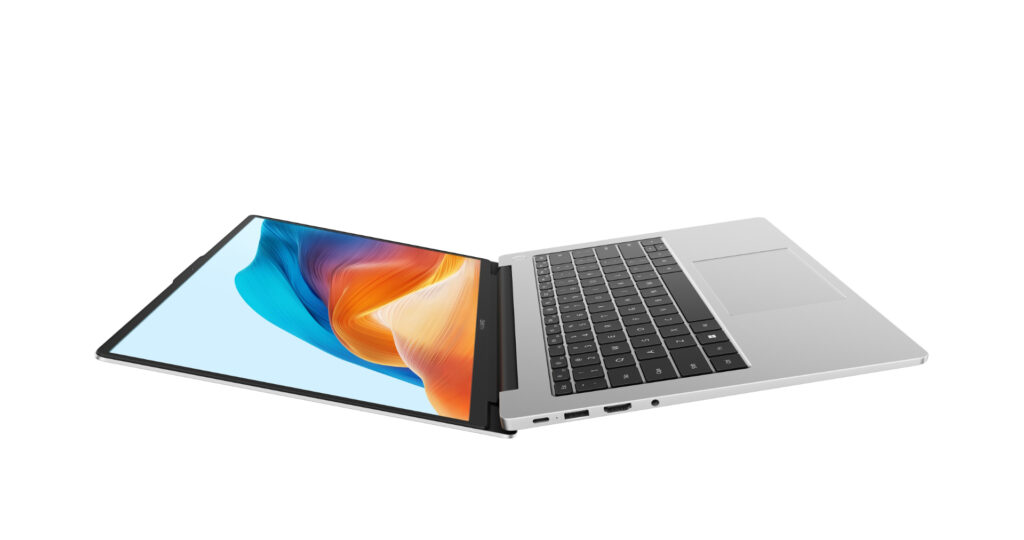
If you are someone who appreciates metal unibodies, narrow bezels and an understated aesthetic, the Mate Book D 14 ticks those boxes. The best Huawei Mate Book D 14 Laptop in 2025 D-series is typically built from aluminium alloy with a subtle hinge design and a flush keyboard deck. The hinge allows the screen to open comfortably to 140 degrees for stable lap or desk use the chassis does not flex noticeably under normal typing pressure.
Key design highlights:
- Compact footprint – 14-inch chassis that fits in most 13.3″ laptop bags while offering a larger readable area than 13-inch devices.
- Keyboard & trackpad – Huawei usually equips the D 14 with a shallow-but-pleasant scissor keyboard with good key travel for an ultrabook, the trackpad is wide and uses precision drivers. Long typing sessions are comfortable a major reason writers love the D 14 lineage. Reviewers and long-term users often praise its typing feel.
- Port selection – Expect at least one USB-C charging & data, 1–2 USB-A, an HDMI or micro HDMI on some SKUs, and a 3.5mm jack. If you use many peripherals, confirm port count for the SKU you plan to buy.
Display: Readable, Sharp, and Writer-Friendly
One of the Mate Book D 14 strengths is its screen, Huawei balanced color accuracy, contrast and a higher screen-to-body ratio. Many modern Mate Book D 14 models use a 16:10 effective area or optimized 16:9 FHD panels this slightly taller aspect ratio improves vertical reading space, which is valuable for writing and editing long documents.
Keyboard and Typing Experience One of The Strongest Selling Points
If your primary work is typing articles, academic work, long emails, a laptop’s keyboard is arguably the single most important factor. The Mate Book D 14 has earned praise in user reviews and long-term writeups for this best Huawei Mate Book D 14 laptop in 2025:
- Key travel & feedback: A tactile yet quiet scissor mechanism that balances travel and feedback comfortable for extended sessions.
- Layout: Full-size arrow keys, adequate spacing, and an ergonomic layout that minimizes mispresses.
- Backlight: Many SKUs include a two-level backlight useful in low-light work environments.
- Fingerprint power button: Often integrated into the top-right or power key for quick sign-in.
Performance & Thermals Real-World Observations
Typical Performance Profile
- Daily productivity: Browsing dozens of tabs, word processors, email, Slack/Teams, Zoom calls the D 14 handles these tasks comfortably when configured with 8–16GB RAM and a modern Intel/AMD CPU.
- Light content creation: Photo editing, light video trimming and cloud-driven creative tasks are feasible. For heavy video editing or 3D work, consider more powerful models with discrete graphics.
- Thermal behavior: Ultrabooks always balance surface temps and sustained performance. The D 14’s cooling can throttle slightly under long, heavy CPU loads (e.g., long video exports). For writing and everyday tasks, thermals are well managed. Independent reviews highlighted zippy multitasking and calm operation under normal use.
Battery Life & Charging Long Sessions Without Power Anxiety
Battery life is crucial for mobile writers. The Mate Book D 14 typically packs a battery in the 56–60Wh range and supports USB-C PD fast charging with bundled 65W or similar chargers in many markets.
Real-world expectations:
- Productivity web, docs, light multimedia: 7–10 hours is realistic on balanced brightness and power settings for most modern SKUs.
- Heavy use video streaming, editing: 4–6 hours depending on load and screen brightness.
- Fast charging: The included charger often restores a significant portion of battery quickly. Always check the SKU’s charger in the box for exact wattage. Some reviewers reported long battery life for day-to-day writing tasks.
Software & Ecosystem: Windows vs Harmony OS Prospects
Historically the Mate Book D 14 shipped with Windows, and most buyers worldwide expect Windows 11. However, the best Huawei Mate Book D 14 Laptop in 2025 moves to put Harmony OS on certain laptop lines and cross-device features affect the overall user experience:
- Windows 11 typical: Complete compatibility with mainstream productivity apps Microsoft 365, browser extensions, Google Docs, Scrivener, Grammarly etc recommended for most users.
- Harmony OS/Mate Book synergy: Huawei advertises “Super Device” cross-device collaboration drag files between devices, link screens etc, and Harmony OS laptops like Mate Book Pro show Huawei’s vision for ecosystem integration. If you own Huawei phones/tablets, the multi-device features clipboard sharing, app streaming can be attractive. Reuters covered Huawei’s Harmony OS laptop launches in 2025 check region support before buying.
Ports, Expandability and Upgrades
Many ultrabooks, including the Mate Book D 14, favour soldered components for thinness. Typical considerations:
- RAM: Often soldered (non-upgradeable) choose 16GB if you multitask heavily.
- Storage: NVMe slots may be available on some SKUs confirm with the retailer/manufacturer if you plan to upgrade SSD later.
- Ports: USB-C with PD is increasingly the main port, a USB-A and HDMI are common. If you use many peripherals, get a compact USB hub or a dock.
Pricing & Availability (India & Global)
Pricing fluctuates by SKU, promotions, and region. As an example of typical market positioning:
- Entry SKUs (8GB/256GB) – Targeted around budget ultrabook pricing in many markets check local retailers.
- Mid SKUs (8/16GB, 512GB) – Competitive with other thin ultrabooks in India, Mate Book D 14 older RyZen/i5 models historically sat in the ₹60k–₹90k band depending on configuration and sales. Retail listings and price aggregators can show current offers and exact SKU prices.
Pros & Cons Quick Snapshot
Pros
- Excellent keyboard and typing comfort (ideal for writers).
- Compact 14-inch footprint and premium metal build.
- Balanced performance for productivity tasks.
- Good battery life in daily use and USB-C fast charging.
- Attractive price-to-performance ratio in many markets.
Cons
- RAM may be soldered in many SKUs choose configuration wisely.
- Not a powerhouse for heavy video editing or gaming (integrated graphics only in most SKUs).
- Port selection is adequate for most but limited for power users without a hub.
- Regional OS/feature differences: Harmony OS availability vs Windows varies confirm before purchase.
How the Mate Book D 14 Compares to Close Competitors
Apple MacBook Air (M-Series)
- Strengths over D 14: Superior CPU/GPU efficiency in many workloads, excellent battery life, premium ecosystem (macOS), top-class display and trackpad.
- Strengths of D 14: Lower price in many regions, Windows ecosystem, port selection for legacy peripherals, often more affordable repair/parts.
Dell XPS 13 or Similar Premium Windows Ultrabook
- XPS strengths: Exceptional display options (higher brightness, color gamut), premium build and a slightly smaller footprint.
- D 14 strengths: Better price/value, comfortable keyboard for long typing sessions, very good for everyday productivity without premium price tag.
Lenovo ThinkPad/ T14s
- ThinkPad strengths: Business durability, keyboard excellence (ThinkPad keyboards are legendary), enterprise features.
- D 14 strengths: Consumer value and more modern thin-and-light styling for similar budgets.
Choosing between these depends on whether you want raw premium performance, OS preference, or best value for writing and portability.
Recommended : Configurations For Common User Types
The following are recommendation for configuration for common user types for the best Huawei Mate Book D 14 Laptop in 2025:
- Writer & student (primary use: web, docs, research): 8GB RAM, 256–512GB SSD choose 512 if you store many files locally. Battery life prioritized over raw CPU.
- Power writer / multi-tasker (heavy tabs, multiple apps, light photo editing): 16GB RAM, 512GB SSD, Intel i5/i7 SKU.
- Creator / light editor: 16GB RAM, higher CPU tier (i7) and 1TB SSD if you edit many assets consider a discrete GPU elsewhere if video editing is frequent.
- Budget buyer: Choose Ryzen/i5 SKU with 8GB + 256–512GB SSD during sales plan to use cloud storage for large media.
Accessories and Tips For the Writer
- External monitor: A 24–27″ external monitor for long writing sessions at a desktop improves comfort and productivity.
- USB-C hub: Adds extra USB-A, Ethernet, HDMI and SD slots.
- Ergonomic stand & external keyboard: If you write long hours at a desk, an external mechanical keyboard and laptop stand will reduce neck/shoulder strain.
- Privacy & backups: Use cloud backups (OneDrive, Google Drive) and a privacy screen if you work in public.
- Keyboard covers & maintenance: For spilled coffee prevention, use a thin keyboard cover and clean vents occasionally.
Real-World User Notes & Common Questions
- Is the MateBook D 14 good for long writing sessions? Yes the keyboard and battery life are optimized for long stretches of typing. Many users report comfort comparable to laptops that cost more.
- Can I run professional writing tools? Absolutely, Microsoft Word, Scrivener, Ulysses (macOS only), Google Docs, and Grammarly are all supported under Windows. If you rely on macOS-only tools, consider a MacBook instead.
- How long will the D 14 last? Build quality is solid with proper care and moderate workloads, you can expect multiple years of service. Battery lifespan depends on charge cycles and how you manage charging battery health modes help.
- Should I buy Windows or wait for a Harmony OS variant? For maximum app compatibility, buy the Windows SKU. If you own a Huawei phone/tablet and value deep device integration, investigate HarmonyOS laptops but be sure to confirm app availability and your workflow compatibility. Reuters covered Huawei’s HarmonyOS laptop rollout in 2025 region availability differs.
Step-by-Step Buyer Checklist
The following are step-by-step buyer checklist for the best Huawei Mate Book D 14 Laptop in 2025:
- Pick RAM first: If soldered, pick 16GB if you multitask heavily.
- Choose SSD size: 512GB is a good balance for writers who store lots of local files, otherwise 256GB+ cloud is okay.
- Confirm ports: Ensure the SKU has the ports you need (HDMI, USB-C with PD, etc.).
- Check OS & regional warranty: Confirm Windows/HarmonyOS and local warranty/after-sales coverage.
- Look for promotions: Festival/seasonal sales can lower price substantially. Check authorized resellers for verified warranties.
Who Should Buy the Huawei Mate Book D 14 in 2025?
The following people can buy this best Huawei Mate Book D 14 laptop in 2025:
- You type a lot and want a comfortable keyboard in a compact 14″ chassis.
- You want a premium metal build and good battery life without paying premium flagship prices.
- You appreciate Huawei’s device collaboration features and/or need a balanced Windows laptop for everyday productivity.
Frequent Ask Questions (FAQ)
Peoples are generally asks this best Huawei Mate Book D 14 Laptop in 2025:
Q: Does the Mate Book D 14 support fast charging?
A: Yes many SKUs include a 65W PD charger, charging speeds vary by SKU.
Q: Is the screen suitable for long reading/writing sessions?
A: Yes the display’s resolution and aspect ratio (16:10 on some SKUs) improve readability and reduce scrolling.
Q: Can I upgrade RAM later?
A: Often no many models have soldered RAM. Buy the RAM configuration you expect to need.
Q: Where to buy in India?
A: Authorized retailers and online marketplaces list D 14 SKUs check official Huawei India channels and reliable retailers for warranty and after-sales service. Price aggregators show current MSRP and deals.
Conclusion
The best Huawei Mate Book D 14 laptop in 2025 clearly proves that a laptop does not need to be expensive or overly powerful to be truly effective for everyday work. What makes this device special is not a single standout feature, but the way all its elements come together in a balanced and practical manner. For writers, students, professionals, and remote workers, the Mate Book D 14 delivers exactly what is needed; a comfortable typing experience, a clean and professional design, dependable performance, and battery life that supports long, uninterrupted work sessions.
In a market filled with flashy specifications and premium pricing, the best Huawei Mate Book D 14 laptop in 2025 remains refreshingly focused on real-world usability. Its well-tuned keyboard encourages productivity during long writing hours, while the crisp and spacious display makes reading, editing, and research less tiring on the eyes. The lightweight metal chassis further enhances its appeal, allowing users to work comfortably whether at a desk, in a classroom, or on the go.
Performance-wise, he best Huawei Mate Book D 14 laptop in 2025 strikes the right balance for its target audience. It handles multitasking, web-based research, document editing, and light creative workloads smoothly, without unnecessary noise or heat. While it may not be designed for heavy gaming or advanced video production, it was never meant to be. Instead, it excels as a reliable daily companion for those who value efficiency, stability, and consistency over raw power.