
Table of Contents

Introduction: Best Laptops Next-Gen: OLED, Foldables & Touchscreens 2025
Best laptops Next-Gen: OLED, foldables & touchscreens 2025 displays are the single most visible part of a laptop, they are where you watch, design, edit, code, game and present. Over the last few years laptop display tech has stopped being “good enough” and started driving real purchase decisions. In 2025 that shift is louder than ever: OLED panels that deliver cinematic blacks and saturated color, foldable OLEDs that turn a clamshell into a tablet-sized canvas, and the slow-but-steady entry of full touchscreen MacBooks are rewriting how a laptop feels to use. If you want the brightest highlights, deepest blacks, most accurate colors or unusual form factors the display now makes or breaks the device. In 2025, next-generation screens OLED, foldable panels, and advanced touch-enabled designs are rewriting the rules for performance, creativity, and entertainment. These technologies do not just make a laptop look better; they change how you use it. Whether you are a content creator seeking cinema-grade color, a multitasker who wants a massive foldable canvas, or a student who needs a responsive touchscreen for note-taking, the latest display innovations open possibilities that were unimaginable just a few years ago. This article explores the very best laptops that showcase these next-gen displays, compares their strengths and tradeoffs, and helps you decide which cutting-edge screen is worth your investment today.
1) Why display tech matters more than ever
The best laptops Next-Gen: OLED, foldables & touchscreens 2025, a few reasons displays have graduated from “feature” to “centerpiece”:
- Content standards rose: Streaming services, HDR video, and high-bit-depth photo workflows reward panels that can reproduce deep black and wide color gamuts.
- Creatives demand accuracy: Photographers, video editors and designers rely on color accuracy and dynamic range; an OLED or high-end Mini-LED can be the difference between a usable device and one that needs external monitors.
- Form-factor innovation unlocked new use cases: Foldables expand screen real estate without adding bulk, touch improves interactivity for note-taking, sketching and media control.
- User expectations changed: People want laptop screens that feel premium and not only for image quality but for responsiveness, reflectance, and high refresh rates in gaming or motion-sensitive tasks.
2) The core display technologies explained what they do, not just marketing
OLED (Organic Light-Emitting Diode)
The OLED for best laptops Next-Gen: OLED, foldables & touchscreens 2025:
- How it works: Each pixel emits its own light, so black pixels are truly off → perfect black levels and effectively infinite contrast ratio.
- Strengths: Superb contrast, vibrant colors, excellent for HDR and dark scenes, fast pixel response good for motion.
- Weaknesses: Historically lower sustained peak brightness vs Mini-LED for HDR spec sheets, though newer panels are narrowing that gap. Risk of image burn-in with static UI elements over very long periods, manufacturers mitigate with software. Can be slightly less crisp than Mini-LED for small text if pixel density is low.
Mini-LED / Full-Array Local Dimming
Mini-LED/Full-Array Local Dimming for best laptops Next-Gen: OLED, foldables & touchscreens 2025:
- How it works: Many tiny LEDs illuminate an LCD panel with zone dimming to raise local contrast.
- Strengths: High peak brightness, great for HDR spec brightness, very good for scenes needing highlights, fewer long-term burn risks.
- Weaknesses: Not true pixel-level black like OLED, halo/bloom around bright objects can occur; thicker backlight assemblies.
IPS / Traditional LCD
The IPS/Traditional LCD for best laptops Next-Gen: OLED, foldables & touchscreens 2025:
- How it works: Backlit LCD layer with IPS liquid crystal for wide viewing angles.
- Strengths: Reliable color, no burn-in, generally more power-efficient in some use cases and typically cheaper.
- Weaknesses: Contrast ratio and black levels lag behind OLED/Mini-LED.
QD-OLED (Quantum Dot OLED) & advances
QD-OLED for the best laptops Next-Gen: OLED, foldables & touchscreens 2025:
- How it works: Mixes OLED self-emissive tech with quantum dots to boost color and brightness. Powerful on small panels and gaining traction in high-end products.
- Note: This hybrid tech bridges some Mini-LED brightness advantages while keeping OLED’s pixel-level blacks. Emerging but promising.
3) Foldable OLEDs: the breakthrough format – what exists in 2025 and how to use them
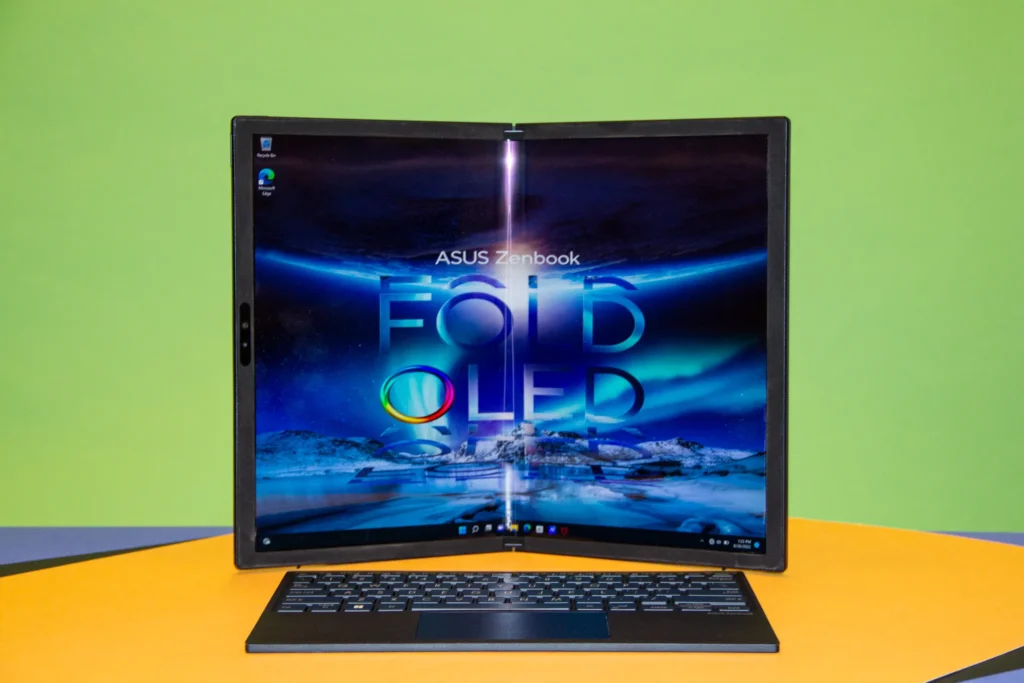
The best laptops Next-Gen: OLED, foldables & touchscreens 2025 laptops put a large OLED that folds into more compact shapes. The UX possibilities are compelling: a 17-inch canvas that folds into a lighter package, or multi-pane workflows where you run an app on the top half and keyboard below.
Real devices to know (2024–25):
- ASUS Zenbook 17 Fold OLED: A large 17.3″ foldable OLED that unfolds into a tablet; marketed for creatives and multitaskers who want a larger canvas without a heavier chassis. It ships as a keyboard + foldable display arrangement.
- Lenovo ThinkPad X1 Fold: ThinkPad family’s take on foldable productivity (clamshell/tablet hybrid) with a focus on enterprise durability and software optimizations for multi-pane workflows. Laptop Mag and other reviewers highlight its unique workflow despite sharp price and occasional software rough edges.
What foldables are best at:
- Large canvas workflows: Editing, reviewing, reference documents and multitasking.
- Presentations and collaborative viewing: Fold out a full display for a client.
- Tablet-first tasks: Sketching, annotating, note taking with a stylus.
What to watch out for:
- Hinge durability & pixel stress: Even with modern manufacturing, a foldable hinge is a moving part that needs care. Expect slightly more fragility than a conventional clamshell.
- Price and weight tradeoffs: Foldables often carry a premium for the panel and hinge, and sometimes have thicker bezels or slightly heavier builds than ultralight clamshells.
- Software ergonomics: Windows handles touch and multi-window layouts well; macOS still leans toward traditional clamshell interactions. That affects how natural the foldable experience feels.
4) Touchscreens on laptops – where we are in 2025
Touchscreens in Windows laptops are widespread: convertibles, 2-in-1s and clamshell touch notebooks give buyers plentiful options. On macOS, touch has been resisted historically, Apple prioritized separation between iPad and Mac. But that stance is changing: several reports in 2025 indicate Apple plans to ship an OLED MacBook Pro with on-cell touch tech in the 2026 timeframe, a significant shift in Apple’s laptop strategy. If true, that means a high-polish touchscreen experience on a MacBook may arrive in the next 12–24 months.
Practical implications today:
- If you need touch now: Buy a Windows convertible or 2-in-1 (Surface, Lenovo Yoga, HP Spectre x360, many ASUS models). The pair touch with active-pen support and optimized apps.
- If you prefer macOS: Wait for rumored touchscreen MacBooks if touch is critical; otherwise use iPad + Sidecar or dedicated iPadOS apps for touch workflows for now.
5) Real-world comparison: OLED vs Mini-LED vs IPS – what you will see
The real-world comparison for the best laptops Next-Gen: OLED, foldables & touchscreens 2025 are given below:-
Contrast & blacks
- OLED wins: True blacks, no backlight bleed. Great for dark scenes and cinematic content for the best laptops Next-Gen: OLED, foldables & touchscreens 2025.
HDR highlights (peak brightness)
- Mini-LED often wins: On spec sheets for peak nits, which matters for HDR highlights in bright scenes; OLED panels are improving (and QD-OLED narrows the gap) for the best laptops Next-Gen: OLED, foldables & touchscreens 2025.
Color accuracy & calibration
- High-end OLED and Mini-LED panels can both be factory calibrated; for pro work, choose models with Pantone/Calman certification or support for hardware calibration.
Text sharpness & small fonts
- At equal pixel density, differences are small. At lower pixel density, Mini-LED with high PPI can look crisper than some OLED laptops. If you work with small text, check pixel density (PPI).
Power & battery life
- OLED can be more efficient: for mixed usage, especially when using dark themes and when many pixels are black (each dark pixel is off). But when showing bright or white-heavy content, OLED can draw more power. Real battery life varies by panel peak brightness settings, power management and the machine’s thermals.
Burn-in risk
- OLED has some risk: over many years with static UI elements (menu bars, taskbars). Manufacturers mitigate with pixel shifting, adaptive UI dimming and other software tricks. If you keep static UI elements for years, consider a Mini-LED or high-quality IPS if burn-in worries you.
6) Top laptop picks in 2025 (by use case) – deep dives
Note: These selections focus on models notable for their display tech or how they exemplify next-gen screens. Prices and exact SKUs vary by region; check local retailers for current availability.
A. Best overall OLED laptop (balance of price, performance, and display)
Asus Zenbook 14 / 14 OLED & Dell XPS OLED variants
Why: Both vendors offer excellent 14–16″ OLED panels with balanced color profiles, decent brightness, and thin designs. LaptopMag and PCWorld have consistently recommended Asus’ OLED ultrabooks for normal users who want color and battery life without the heavy price of a mobile workstation.
Who should buy it: Content creators on a budget, students, professionals who want vivid color without the foldable premium.
B. Best foldable / big-canvas novelty (productivity+creativity)
Asus Zenbook 17 Fold OLED
Why: A genuine 17.3″ panel that folds into a portable shape great when you need a big canvas for design or reference. It’s an example of how manufacturers are shipping foldable consumer laptops rather than just concept devices. Real reviews praise the novelty and the flexible workflows but note the premium price and hinge care.
Who should buy it: Designers who value a single-device workflow and do not want to carry both a laptop and a tablet.
C. Best enterprise foldable
Lenovo ThinkPad X1 Fold (line)
Why: Focus on durability, enterprise manageability, and a workflow that can lean into a full-sized tablet or a laptop with an attachable keyboard. Laptop Mag notes Lenovo’s attention to enterprise robustness.
Who should buy it: Power users in enterprise environments who need a novel form factor and ThinkPad reliability.
D. Best touchscreen convertible (everyday)
Dell XPS 13/2-in-1, HP Spectre x360, Microsoft Surface
Why: Mature touch support, stylus ecosystems, 2-in-1s that convert into tablets and handle Windows touch gestures. If touch is a must, these mainstream convertibles give the best value and software support.
Who should buy it: Students, note-takers, and anyone who uses stylus-based annotation.
E. The “wait for it” pick (if you want macOS + touchscreen + OLED)
Rumored: Apple OLED MacBook Pro with touch (2026)
Why: Multiple reports in 2025 point to Apple mass producing an OLED MacBook Pro with on-cell touch tech in late 2026. If you prefer macOS and want touch & OLED, waiting could be sensible but it depends on urgency and your tolerance for rumors.
Who should wait: MacBook users who need touch and are not in immediate need of an upgrade.
7) Buying guide: What to check before you buy a next-gen display laptop
1. Panel specs, but don’t be blinded by numbers
- Resolution & PPI: At common laptop sizes 14–16″, 2.8K–4K panels provide extra workspace useful for creators. For average users, 1920×1200 to 2880×1800 is a practical sweet spot.
- Peak brightness (nits): For HDR and outdoor use, higher peak nits matter. Mini-LED laptops often advertise 1000+nits HDR peaks, OLED typically lists lower SDR nits but great contrast.
- Color coverage: sRGB for web, Adobe RGB/P3 for pro photo/video. If your work requires accuracy, choose models with factory calibration or certification.
2. Software & OS readiness
- Touch & gestures: Windows is touch-native; macOS historically lacks full touch UI but that may change post-2026. If you plan to use touch heavily, test the OS experience in store or on loaner units.
3. Battery & brightness tradeoff
- If you do lots of white-page reading or coding: OLED may draw more power than IPS at high brightness. If you use dark themes, OLED shows its efficiency strengths. Always check real-world battery tests for the exact model.
4. Durability & warranty for foldables
- Extended coverage is worth it: Foldables have more moving parts and sometimes new failure modes. Consider generous warranty options if you buy a foldable.
5. Ports & external monitor workflows
- Professionals often need to connect to color-calibrated external monitors; make sure the GPU and connectors (Thunderbolt 4 / USB-C DP Alt Mode) support your external display demands.
8) Workflows: who benefits most from each display type?
- Photographers & video editors: OLED and QD-OLED for contrast and color; prefer models with hardware calibration.
- Graphic designers & illustrators: Foldable OLEDs or large OLED laptops if you want a larger single-device canvas; touch + pen support matters.
- Gamers: High refresh rate OLEDs are excellent for speed and color, but gaming laptops also rely on cooling and discrete GPUs check thermal design and refresh rate options. Mini-LED is also an attractive option for HDR bright scenes.
- Business users: High contrast and readability matter less than battery life and durability; consider whether an OLED’s burn-in concern is acceptable for static enterprise UIs.
- Students & general users: OLED ultrabooks give a premium viewing experience; convertibles give touch+stylus flexibility.
9) Real world testing insights (how reviewers think about displays)
The best laptops Next-Gen: OLED, foldables & touchscreens 2025, reviewers and labs look beyond specs:
- Colorimeter tests: for delta-E, gamut coverage and grayscale tracking. Look for models with low delta-E when buying for color work.
- HDR tests: measure sustained peak brightness, tone mapping and local dimming artifacting (for Mini-LED). RTINGS and other labs show Mini-LED can achieve very high sustained nits while OLED’s per-pixel highlights still look spectacular because of the contrast.
- Long term reliability: reviewers often caution on early foldable batches where hinge or glue processes were still maturing. Practical buying tip: buy the generationally improved model (Gen-2 foldables tend to be better).
10) Common myths & the reality
- Myth: OLED always kills battery life. Reality: OLED can be more efficient during dark-mode browsing but can draw more for white/bright workloads. Check real battery tests for models you consider.
- Myth: Burn-in happens in months. Reality: Modern OLED laptops include measures to reduce burn-in, normal varied usage over years is unlikely to produce immediately visible burn-in. Heavy static UI usage for many hours daily increases risk.
- Myth: Foldables are fragile gimmicks. Reality: Early foldables had teething problems, newer models demonstrate practical use for creatives and enterprise. Still, they require more care than sealed clamshells.
11) Future trends to watch (2025 → 2028)
- Apple’s OLED + touch MacBook (rumored 2026): If Apple ships a MacBook Pro with on-cell touch OLED, expect a very polished touchscreen experience that may change professional workflows for macOS users. This is a watchpoint rather than a purchase guarantee.
- QD-OLED adoption: Quantum dot+OLED hybrids will become more common in premium laptops, narrowing Mini-LED vs OLED tradeoffs.
- Higher refresh, adaptive refresh across all panels: Expect OLED panels with 120–240Hz adaptive rates for smoother UI and gaming across ultrabooks and gaming laptops.
- Foldable costs come down & hinge engineering matures: Like every new hardware class, the second and third generations will emphasize durability and software polish.
12) Practical recommendations-what I would buy (scenarios)
Practical recommendation for the best laptops Next-Gen: OLED, foldables & touchscreens 2025:
- You are a photographer or colorist, need a primary machine now: Choose a high-quality OLED laptop with hardware calibration (or a Mini-LED with proven calibration if you need extreme HDR brightness). Check the lab tests for delta-E and gamut.
- You want a single device for note-taking, sketching and occasional editing: A 2-in-1 convertible with OLED+pen support is great (Surface, HP Spectrex360 OLED variants or Asus 2-in-1s). If you want a larger canvas, consider the Zenbook 17 Fold but budget for the premium.
- You are a Mac user who must have touch: If you can wait, the rumored Apple OLED touchscreen MacBook Pro (2026) might be precisely what you want, if not, use an iPad for touch and Sidecar for a Mac workflow.
- You game and want color + speed: Look for OLED panels with high refresh rates and a strong GPU and cooling system, verify thermal throttling tests.
13) Checklist before you hit “Buy”
- Inspect panel in person (if possible) for color & reflectivity.
- Check reviewer measurements for peak brightness, color accuracy and battery life.
- Ask about warranty options for foldables or OLED burn-in coverage.
- Confirm ports and external monitor support for your workflow.
- Consider warranty/accidental damage protection for foldables.
14) Closing thoughts
The best laptops Next-Gen: OLED, foldables & touchscreens 2025 are in an era when display choices meaningfully change what a laptop can do. OLED brings cinema-grade contrast and color, Mini-LED brings HDR peak brightness, foldables expand the practical display area without mandating a heavy chassis. Touchscreens are standard in Windows land and if the 2026 Apple rumors hold true macOS will join the tactile party with OLED touch MacBooks. The right choice depends on your workflow: if color and cinematic blacks matter, choose OLED, if you need extreme HDR highlights, consider Mini-LED, if you want novelty and a large portable canvas, explore foldables but buy wisely and plan for the premium.
Conclusion
Next-generation displays are no longer niche experiments they are shaping the future of portable computing. OLED laptops bring breathtaking contrast and color accuracy for professionals and movie lovers alike. The best laptops Next-Gen: OLED, foldables & touchscreens 2025 are foldable designs create dynamic form factors that let a single device function as both tablet and workstation. Touchscreens continue to enhance interaction, with Windows devices already mature and even Apple preparing to enter the touch-enabled arena. Each technology carries its own set of advantages and considerations, from battery life to durability, but all share a common goal: to make your laptop more immersive, flexible, and visually stunning. By understanding these innovations and choosing the right model for your needs, you are not just buying a computer you are stepping into the next chapter of laptop evolution.
